Google Support
Google Support - Tutorials
Active Stockton students receive a Google Workspace account that includes Gmail, Google Drive, and other Google services. Your Stockton student email address uses the format username@go.stockton.edu.
🧭 Overview
- Access your Stockton Google Workspace account.
- Use Gmail in a web browser or on a mobile device.
- Upload and share files from Google Drive.
- Best for: Stockton students.
Before You Begin
- Active Stockton student account.
- Your full username@go.stockton.edu email address.
- Your GoPortal username and password.
- Duo authentication when prompted.
Google Workspace Tutorials
Select a topic below to view step-by-step instructions.
Access Student Gmail in a Web Browser
Access Student Gmail
Use Gmail in a web browser to access your Stockton student email account.
-
Open Gmail
Go to mail.google.com.
-
Choose or add an account
If you are already signed in to another Google account, select the profile icon in the upper-right corner and choose Add another account.
-
Enter your Stockton email
Enter your full student email address in this format: username@go.stockton.edu.
-
Sign in through Stockton
When redirected to Stockton's sign-in page, enter your GoPortal username and password. Complete Duo authentication if prompted.
Access Student Gmail on iPhone or iPad
Gmail for iPhone and iPad
Use the Gmail app to access your Stockton student email on an iPhone or iPad.
-
Install Gmail
Download the Gmail app from the Apple App Store.
-
Add an account
Open Gmail, select the profile icon in the upper-right corner, and choose Add another account. If this is your first account, follow the prompt to add an account.
-
Select Google
Select Google as the account type.
-
Sign in
Enter your full username@go.stockton.edu email address, then sign in using your GoPortal credentials. Complete Duo authentication if prompted.
Access Student Gmail on Android
Gmail for Android
Use the Gmail app to access your Stockton student email on an Android device.
-
Install Gmail
Download the Gmail app from Google Play, if it is not already installed on your device.
-
Add an account
Open Gmail, select the profile icon in the upper-right corner, and choose Add another account.
-
Select Google
Select Google as the account type.
-
Sign in
Enter your full username@go.stockton.edu email address, then sign in using your GoPortal credentials. Complete Duo authentication if prompted.
Share Assignment Files with Google Drive
Share Assignment Files with Google Drive
Large files, such as videos, can be difficult to submit directly to a Blackboard assignment and may result in an upload timeout. If your instructor permits it, you can upload your file to Google Drive and submit a share link instead.
-
Open Google Drive
Sign in to your Stockton student Google Drive account. Open the folder where you want to save the file.
-
Upload your file
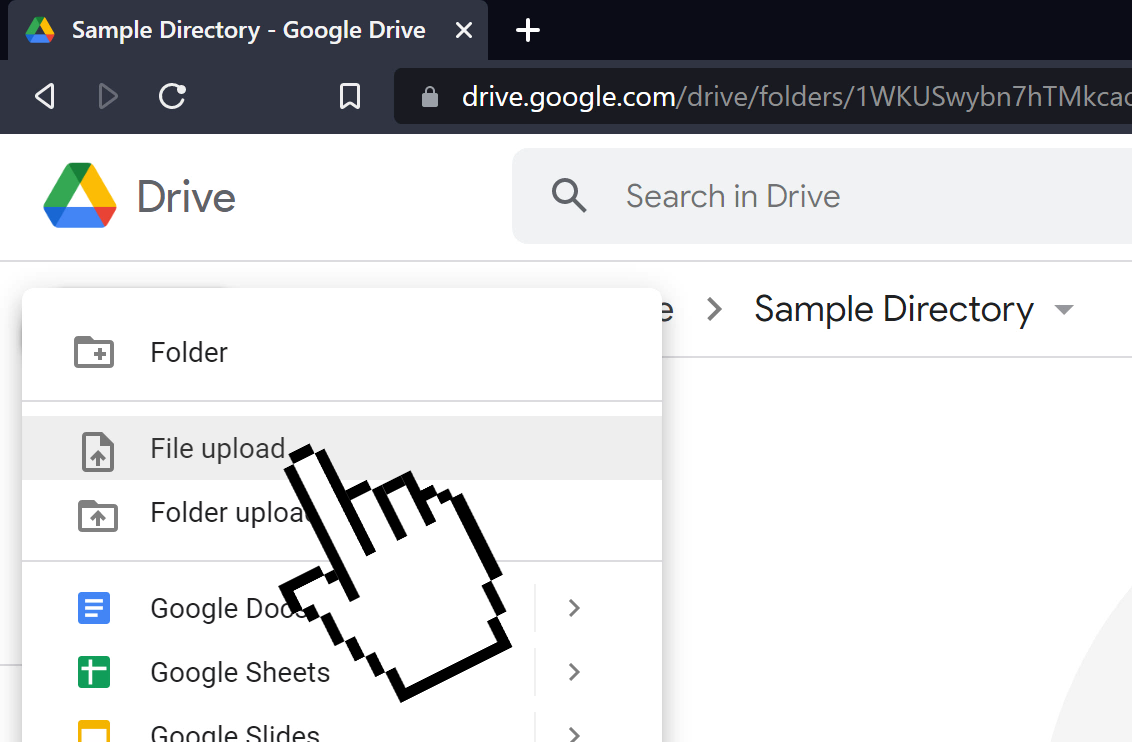
Select the New button, then choose File upload. Select the file you want to upload and wait for the upload to finish.
-
Open sharing options
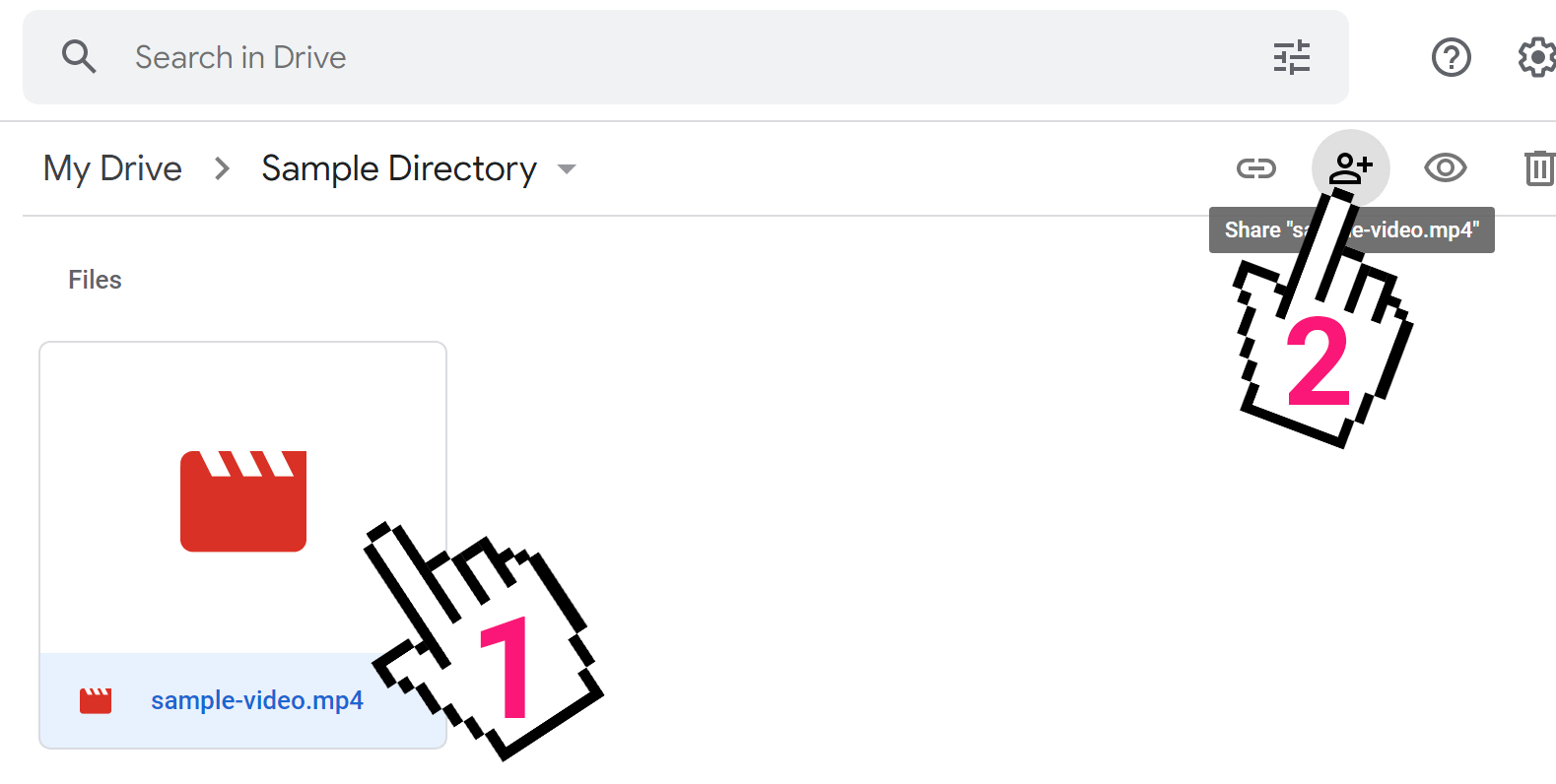
Select the uploaded file in Google Drive, then select the Share button.
-
Choose access permissions
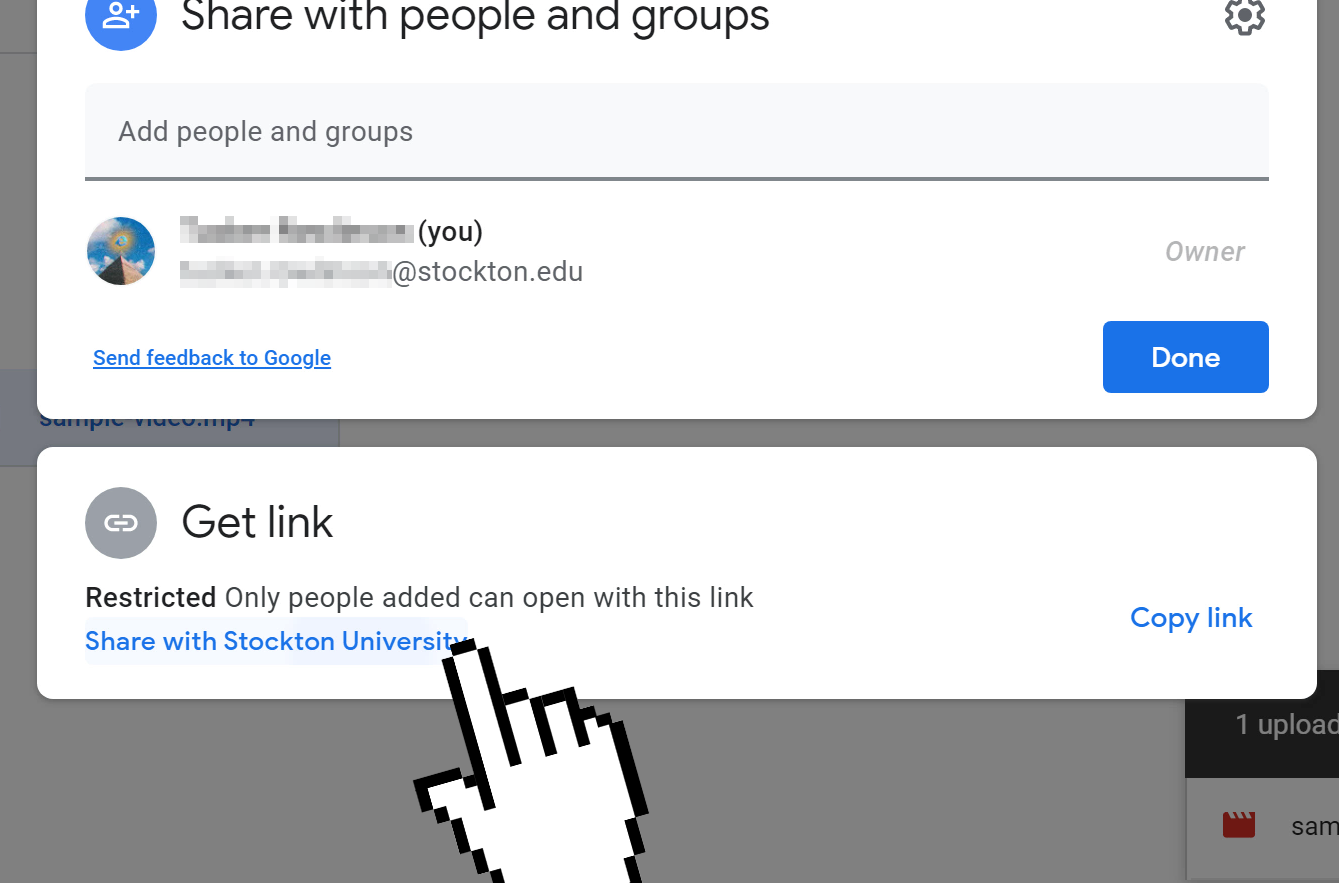
In the Share dialog, select Share with Stockton University if the file should be available only to Stockton users.
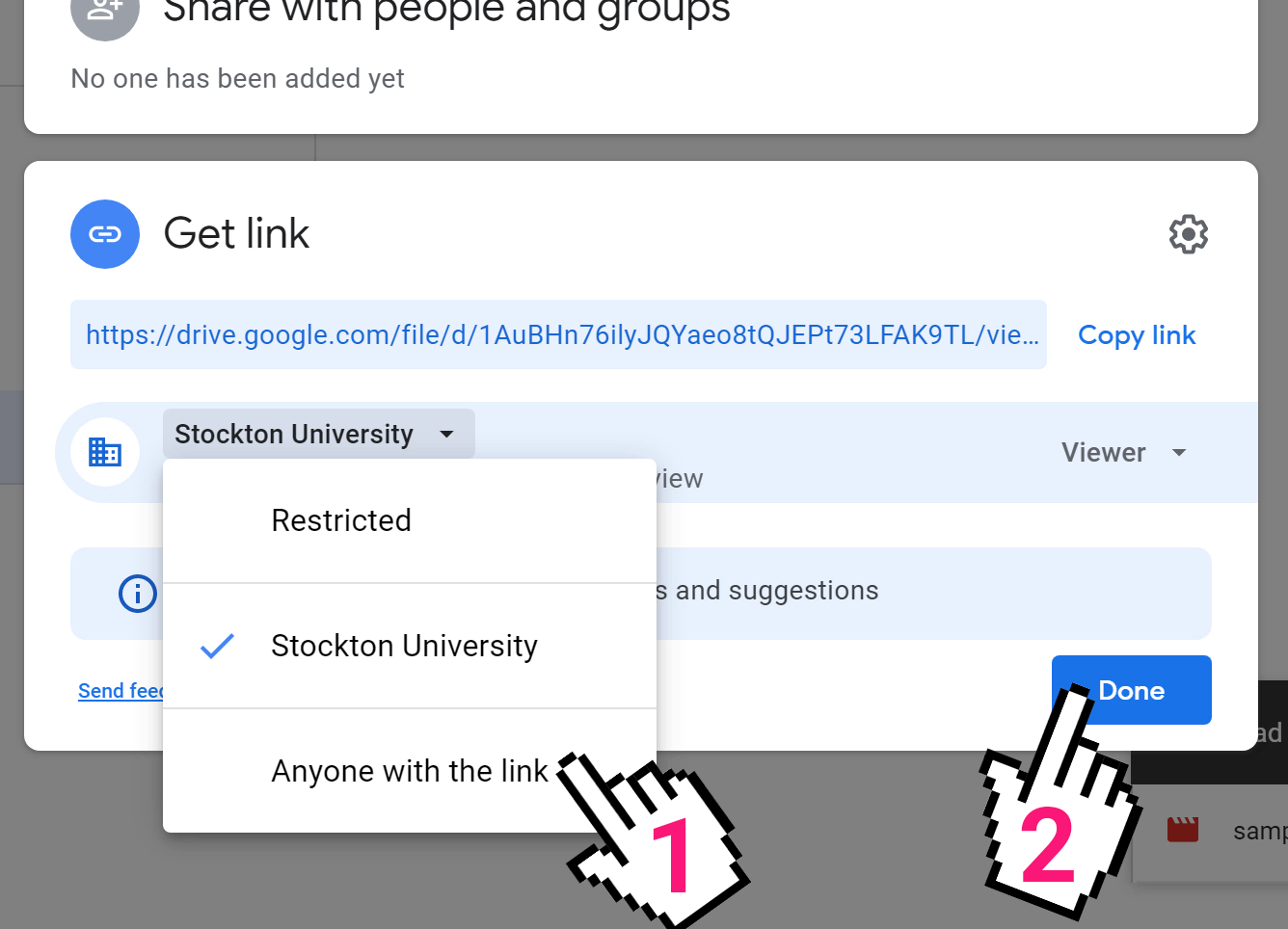
If the file does not contain sensitive information and your instructor permits it, choose Anyone with the link.
-
Copy and submit the link
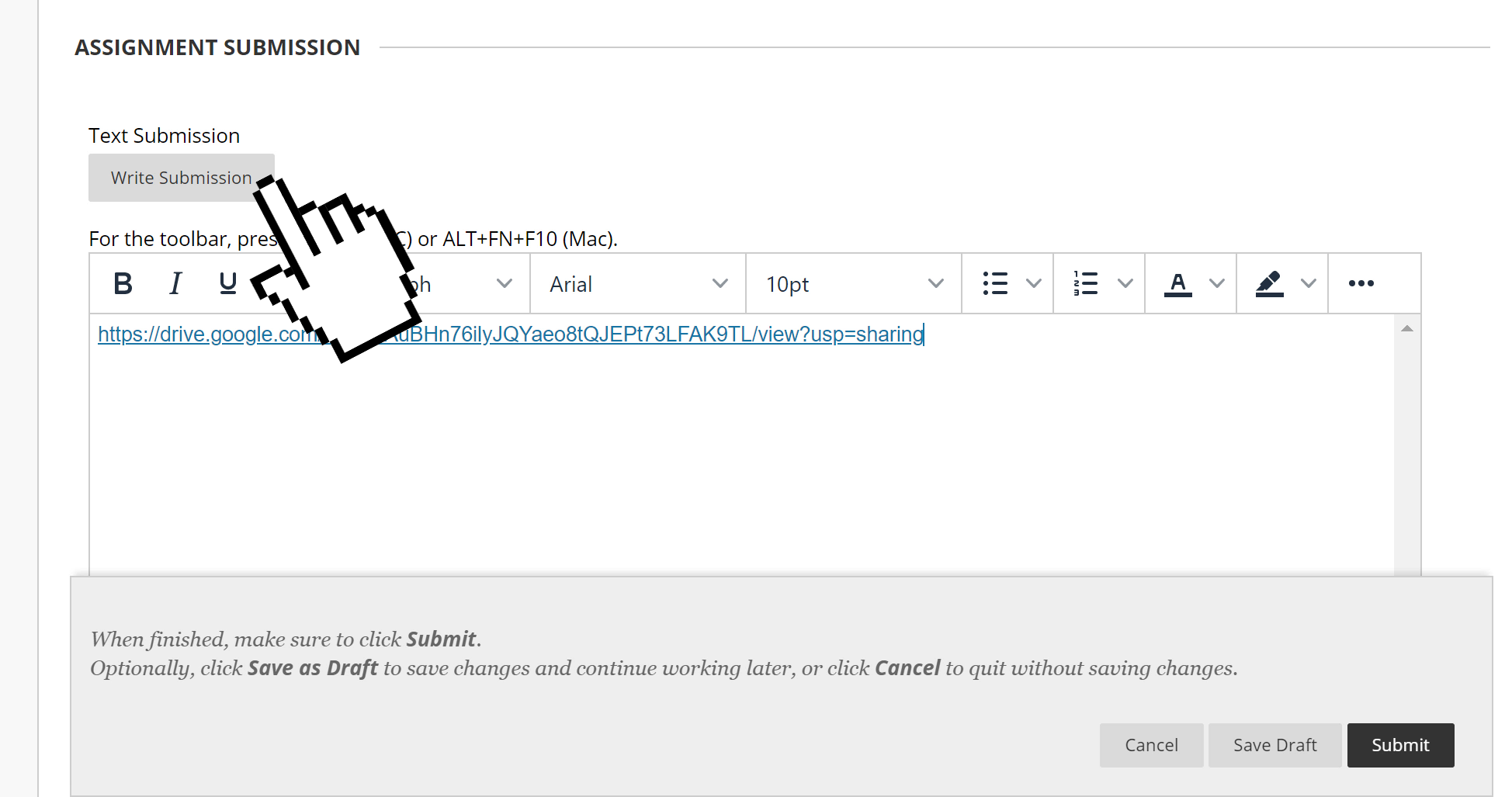
Select Done, then copy the generated link. Share the link by email or paste it into the Write Submission field for your Blackboard assignment.
Important: If your work contains information protected by HIPAA, FERPA, or other privacy requirements, such as medical evaluations or classroom recordings, ask your instructor for an approved sharing method before uploading or sharing the file.
For more help using Google Drive, visit the Google Drive Help Center.
Get help
- Phone: 609‑652‑4309
- ️ Email: helpdesk@stockton.edu
- 🧾 Submit a ticket